


Page 44 - Abbott
P. 44
C. Settings Screen

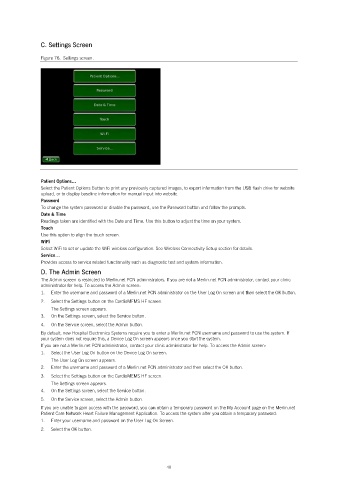
               Figure 76.  Settings screen.


               Patient Options…
               Select the Patient Options Button to print any previously captured images, to export information from the USB flash drive for website
               upload, or to display baseline information for manual input into website.
               Password
               To change the system password or disable the password, use the Password button and follow the prompts.
               Date & Time
               Readings taken are identified with the Date and Time. Use this button to adjust the time on your system.
               Touch
               Use this option to align the touch screen.
               WiFi
               Select WiFi to set or update the WiFi wireless configuration. See Wireless Connectivity Setup section for details.
               Service…
               Provides access to service related functionality such as diagnostic test and system information.
               D. The Admin Screen
               The Admin screen is restricted to Merlin.net PCN administrators. If you are not a Merlin.net PCN administrator, contact your clinic
               administrator for help. To access the Admin screen:
               1.   Enter the username and password of a Merlin.net PCN administrator on the User Log On screen and then select the OK button.
               2.   Select the Settings button on the CardioMEMS HF screen.
                   The Settings screen appears.
               3.   On the Settings screen, select the Service button.
               4.   On the Service screen, select the Admin button.
               By default, new Hospital Electronics Systems require you to enter a Merlin.net PCN username and password to use the system. If
               your system does not require this, a Device Log On screen appears once you start the system.
               If you are not a Merlin.net PCN administrator, contact your clinic administrator for help. To access the Admin screen:
               1.   Select the User Log On button on the Device Log On screen.
                   The User Log On screen appears.
               2.   Enter the username and password of a Merlin.net PCN administrator and then select the OK button.
               3.   Select the Settings button on the CardioMEMS HF screen.
                   The Settings screen appears.
               4.   On the Settings screen, select the Service button.
               5.   On the Service screen, select the Admin button.
               If you are unable to gain access with the password, you can obtain a temporary password on the My Account page on the Merlin.net
               Patient Care Network Heart Failure Management Application. To access the system after you obtain a temporary password:
               1.   Enter your username and password on the User Log On Screen.
               2.   Select the OK button.


                                                            40

