


Page 35 - Abbott
P. 35
Ask the patient to orient and locate the antenna over the position of the sensor.
Ask the patient to press the antenna firmly into their back as much as is still comfortable.
Ask the patient to remove all metallic objects.
Have the patient shift into different positions.
D. Angulation
The signal strength is strongest when the antenna and sensor are parallel. Try these steps to change the angulation:
Ask the patient to orient and locate the antenna over the position of the sensor.
Adjust the search scrollbar until the mean pressure reads near the expected value.
Ask the patient to press the antenna firmly into their back as much as is still comfortable.
E. Solutions for Interference
To reduce interference:
Reduce the amount of metal in the vicinity of the sensor
Reduce the number of electrical equipment and cables in the area
Avoid the use of power strips and poorly grounded outlets when possible
Move the C-arm away from the interrogation site
Uncross guidewire
Move or angle the antenna away from implantable devices
Route ECG leads away from the area which the antenna will be located during a reading
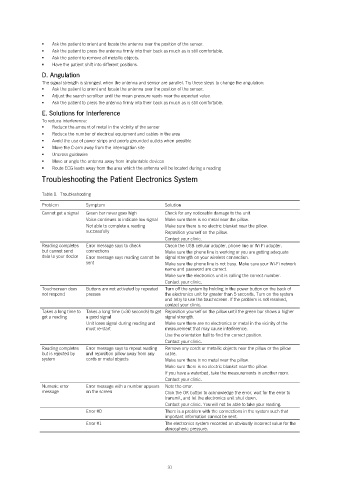
Troubleshooting the Patient Electronics System
Table 1. Troubleshooting
Problem Symptom Solution
Cannot get a signal Green bar never goes high Check for any noticeable damage to the unit.
Voice continues to indicate low signal Make sure there is no metal near the pillow.
Not able to complete a reading Make sure there is no electric blanket near the pillow.
successfully Reposition yourself on the pillow.
Contact your clinic.
Reading completes Error message says to check Check the USB cellular adapter, phone line or Wi-Fi adapter.
but cannot send connections Make sure the phone line is working or you are getting adequate
data to your doctor Error message says reading cannot be signal strength on your wireless connection.
sent Make sure the phone line is not busy. Make sure your Wi-Fi network
name and password are correct.
Make sure the electronics unit is calling the correct number.
Contact your clinic.
Touchscreen does Buttons are not activated by repeated Turn off the system by holding in the power button on the back of
not respond presses the electronics unit for greater than 5 seconds. Turn on the system
and retry to use the touchscreen. If the problem is not resolved,
contact your clinic.
Takes a long time to Takes a long time (>30 seconds) to get Reposition yourself on the pillow until the green bar shows a higher
get a reading a good signal signal strength.
Unit loses signal during reading and Make sure there are no electronics or metal in the vicinity of the
must re-start measurement that may cause interference.
Use the orientation ball to find the correct position.
Contact your clinic.
Reading completes Error message says to repeat reading Remove any cords or metallic objects near the pillow or the pillow
but is rejected by and reposition pillow away from any cable.
system cords or metal objects Make sure there is no metal near the pillow.
Make sure there is no electric blanket near the pillow.
If you have a waterbed, take the measurements in another room.
Contact your clinic.
Numeric error Error message with a number appears Note the error.
message on the screen Click the OK button to acknowledge the error, wait for the error to
transmit, and let the electronics unit shut down.
Contact your clinic. You will not be able to take your reading.
Error #0 There is a problem with the connections in the system such that
important information cannot be sent.
Error #1 The electronics system recorded an obviously incorrect value for the
atmospheric pressure.
31

