


Page 30 - Abbott
P. 30
Step 1: Retrieve Patient Information [follow up no wireless]
               1.   Insert a USB flash drive into the USB port of the computer.
               2.   On the Merlin.net Patient Care Network Heart Failure Management Application, use the Export feature beneath the More
                   Actions link on the Patient Profile tab for your patient. For more information consult the Merlin.net Patient Care Network Heart
                   Failure Management Application Help Manual.

                   NOTE: You can use any USB drive. Most commercial USB drives will be compatible with both the Hospital Electronics System
                   and the computer used to access the Merlin.net Patient Care Network Heart Failure Management Application.
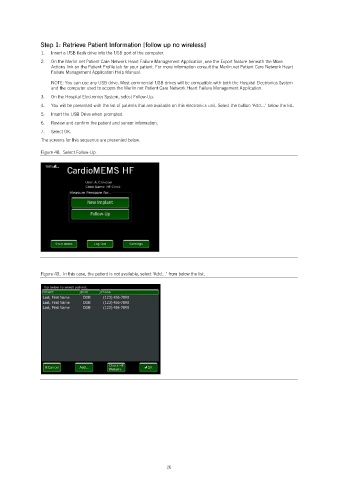
               3.   On the Hospital Electronics System, select Follow-Up.
               4.   You will be presented with the list of patients that are available on this electronics unit. Select the button ‘Add…’ below the list.
               5.   Insert the USB Drive when prompted.
               6.   Review and confirm the patient and sensor information.
               7.   Select OK.
               The screens for this sequence are presented below.

               Figure 48.  Select Follow-Up.


               Figure 49.  In this case, the patient is not available, select ‘Add…’ from below the list.


                                                            26

