


Page 24 - Abbott
P. 24
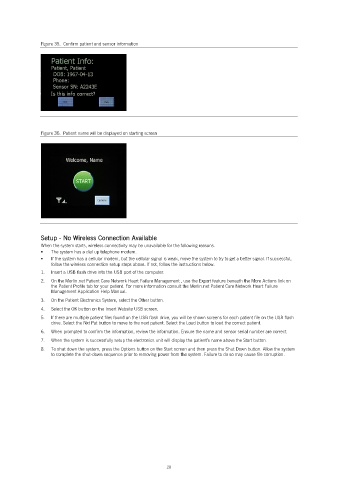
Figure 35. Confirm patient and sensor information
Figure 36. Patient name will be displayed on starting screen
Setup - No Wireless Connection Available
When the system starts, wireless connectivity may be unavailable for the following reasons.
The system has a dial up telephone modem.
If the system has a cellular modem, but the cellular signal is weak, move the system to try to get a better signal. If successful,
follow the wireless connection setup steps above. If not, follow the instructions below.
1. Insert a USB flash drive into the USB port of the computer.
2. On the Merlin.net Patient Care Network Heart Failure Management , use the Export feature beneath the More Actions link on
the Patient Profile tab for your patient. For more information consult the Merlin.net Patient Care Network Heart Failure
Management Application Help Manual.
3. On the Patient Electronics System, select the Other button.
4. Select the OK button on the Insert Website USB screen.
5. If there are multiple patient files found on the USB flash drive, you will be shown screens for each patient file on the USB flash
drive. Select the Nxt Pat button to move to the next patient. Select the Load button to load the correct patient.
6. When prompted to confirm the information, review the information. Ensure the name and sensor serial number are correct.
7. When the system is successfully setup the electronics unit will display the patient’s name above the Start button.
8. To shut down the system, press the Options button on the Start screen and then press the Shut Down button. Allow the system
to complete the shut-down sequence prior to removing power from the system. Failure to do so may cause file corruption.
20

