


Page 23 - Abbott
P. 23
2.   Locally on the electronics using the USB flash drive
                A third option is available as a backup method in case the primary methods are unavailable See Manual Setup Instructions section.
                In this option, no USB flash drive is used and all of the information is entered via the touch screen.
                Setup – Wireless Connection Available
                Most Patient Electronics Systems will have cellular connections. Follow these steps if a cellular connection is available.
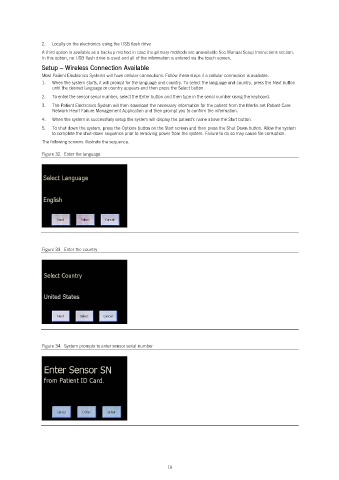
                1.   When the system starts, it will prompt for the language and country. To select the language and country, press the Next button
                   until the desired language or country appears and then press the Select button.
                2.   To enter the sensor serial number, select the Enter button and then type in the serial number using the keyboard.
                3.   The Patient Electronics System will then download the necessary information for the patient from the Merlin.net Patient Care
                   Network Heart Failure Management Application and then prompt you to confirm the information.
                4.   When the system is successfully setup the system will display the patient’s name above the Start button.
                5.   To shut down the system, press the Options button on the Start screen and then press the Shut Down button. Allow the system
                   to complete the shut-down sequence prior to removing power from the system. Failure to do so may cause file corruption.
                The following screens illustrate the sequence.

                Figure 32.  Enter the language


                Figure 33.  Enter the country


                Figure 34.  System prompts to enter sensor serial number


                                                            19

