


Page 21 - Abbott
P. 21
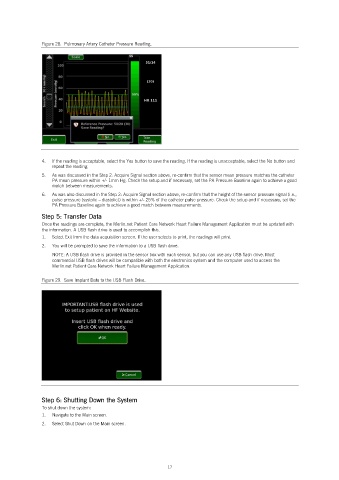
Figure 28.  Pulmonary Artery Catheter Pressure Reading.


                4.   If the reading is acceptable, select the Yes button to save the reading. If the reading is unacceptable, select the No button and
                   repeat the reading.
                5.   As was discussed in the Step 2: Acquire Signal section above, re-confirm that the sensor mean pressure matches the catheter
                   PA mean pressure within +/- 1mm Hg. Check the setup and if necessary, set the PA Pressure Baseline again to achieve a good
                   match between measurements.
                6.   As was also discussed in the Step 2: Acquire Signal section above, re-confirm that the height of the sensor pressure signal (i.e.,
                   pulse pressure (systolic – diastolic)) is within +/- 25% of the catheter pulse pressure. Check the setup and if necessary, set the
                   PA Pressure Baseline again to achieve a good match between measurements.

                Step 5: Transfer Data
                Once the readings are complete, the Merlin.net Patient Care Network Heart Failure Management Application must be updated with
                the information. A USB flash drive is used to accomplish this.
                1.   Select Exit from the data acquisition screen. If the user selects to print, the readings will print.
                2.   You will be prompted to save the information to a USB flash drive.
                   NOTE: A USB flash drive is provided in the sensor box with each sensor, but you can use any USB flash drive. Most
                   commercial USB flash drives will be compatible with both the electronics system and the computer used to access the
                   Merlin.net Patient Care Network Heart Failure Management Application.

                Figure 29.  Save Implant Data to the USB Flash Drive.


                Step 6: Shutting Down the System
                To shut down the system:
                1.   Navigate to the Main screen.
                2.   Select Shut Down on the Main screen.


                                                            17

