


Page 18 - Abbott
P. 18
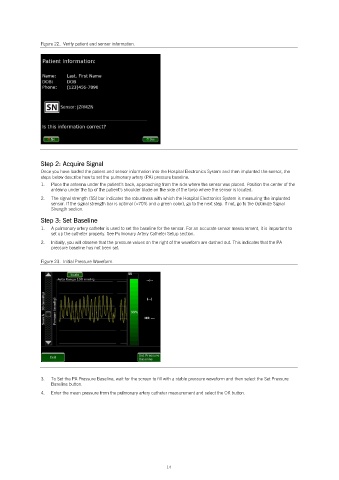
Figure 22.  Verify patient and sensor information.


               Step 2: Acquire Signal
               Once you have loaded the patient and sensor information into the Hospital Electronics System and then implanted the sensor, the
               steps below describe how to set the pulmonary artery (PA) pressure baseline.
               1.   Place the antenna under the patient’s back, approaching from the side where the sensor was placed. Position the center of the
                   antenna under the tip of the patient’s shoulder blade on the side of the torso where the sensor is located.
               2.   The signal strength (SS) bar indicates the robustness with which the Hospital Electronics System is measuring the implanted
                   sensor. If the signal strength bar is optimal (>70% and a green color), go to the next step. If not, go to the Optimize Signal
                   Strength section.

               Step 3: Set Baseline
               1.   A pulmonary artery catheter is used to set the baseline for the sensor. For an accurate sensor measurement, it is important to
                   set up the catheter properly. See Pulmonary Artery Catheter Setup section.
               2.   Initially, you will observe that the pressure values on the right of the waveform are dashed out. This indicates that the PA
                   pressure baseline has not been set.

               Figure 23.  Initial Pressure Waveform.


               3.   To Set the PA Pressure Baseline, wait for the screen to fill with a stable pressure waveform and then select the Set Pressure
                   Baseline button.
               4.   Enter the mean pressure from the pulmonary artery catheter measurement and select the OK button.


                                                            14

